


Read time: 14 minutes
› Library Navigation: Quick Navigation · The Weekly Protocol
The Executive Summary
Meta owns Facebook, and when it disables your ad account, you need two plans on the same day. File one appeal with the documents Meta asks for, then shift the week’s budget to channels that track leads. Renata, who runs a paid-ads agency, did this for three clients. They got 16 of their usual 34 leads in week one, not zero.
Who this is for: agencies at $30K-$150K a month running clients’ Meta ads, and now losing those leads daily.
The problem: your ad account is down, and 40 leads a week stopped with it. Your clients lose about $1,430 in sales each day between them.
The fix: 5 steps:
Read which asset Meta restricted, and why.
File one appeal with the documents that match that reason.
Work out the dollars one day without ads costs each client.
Call every client the same day and ask to put their Meta budget into Google Search.
Put the budget only where tracking already runs, live by Monday.
Time to first result: 15 minutes to know what Meta restricted and have your appeal documents ready.
Written by Nour Boustani for agencies who want their clients’ leads back before Meta answers.
Try this now (under 2 minutes):
On a computer, open Meta’s account troubleshooting page.
Follow its link to Business Support Home, then Account status overview.
Write down what Meta restricted, and the reason it gives.
Check you’re an admin, since only admins can request a review.
Why Meta Gives You Only a Few Appeals
It’s Thursday afternoon, and your ad account just went down. Four clients’ lead ads stop at once. Your first idea is a new ad account under a partner’s profile, live by tonight.
Don’t open it. A second account to dodge the ban breaks Meta’s Advertising Standards, which forbid helping anyone “evade or circumvent” its enforcement. Its review page caps appeals too: “the decision is final.”
So one careful appeal beats three rushed ones sent the same day.
Why I file once and wait:
I’ve watched an agency send one appeal four times in a day, and it got no faster answer.
I treat each rushed appeal as a review I can’t get back, because Meta caps them.
File Your Appeal in 3 Steps
Meta’s troubleshooting page lists what it may ask for. Work through it in this order:
Check what the ban hit: an ad account, a business portfolio, a Page or your own profile. If Meta restricts your personal profile, you can’t run ads from any account.
Fix the cause before you appeal. Remove a strange admin, turn on two-factor login, or take down the flagged ad.
Request one review with the documents for that reason. Then log the date, the reason and what you sent.
A review “typically” takes 48 hours, “although it may take longer in some cases.” Plan your week as if it takes longer.
Before you appeal, download the leads Meta already collected. In Business Suite, open All tools, then Instant forms, then Download. LeadEnforce, which sells lead-sync software, says Meta keeps each lead for 90 days only.
Why Appeals Fail: 3 Mistakes
Three mistakes get an appeal turned down before anyone at Meta reads it:
The wrong reason: a security flag answered with a policy argument doesn’t address what Meta asked.
Missing documents: an identity check with no passport or driver’s license photo stalls.
Repeated submissions: a second appeal with nothing new spends a review for nothing.
Match each stated reason to its documents:
Unusual activity or a hacked account: two-factor on for every admin, strange users removed, your passport photo.
Identity or verification: a passport or driver’s license photo, the account email, the card on file.
Policy breach: the flagged ad removed or fixed, plus one line on what changed.
Payment failure: the cleared payment and a working card on file.
Price One Day Without Ads
Your clients lose sales before Meta answers, so put a number on it before you call them. Multiply each client’s weekly leads by their close rate, then by their average job value. The result is that client’s sales at risk each week. Divide it by 7 for one day.
Say your clients get 40 leads a week between them, and 1 lead in 10 becomes a $2,500 job. That’s $10,000 a week across all of them, or about $1,430 a day. Run the same sum for each client before you call.
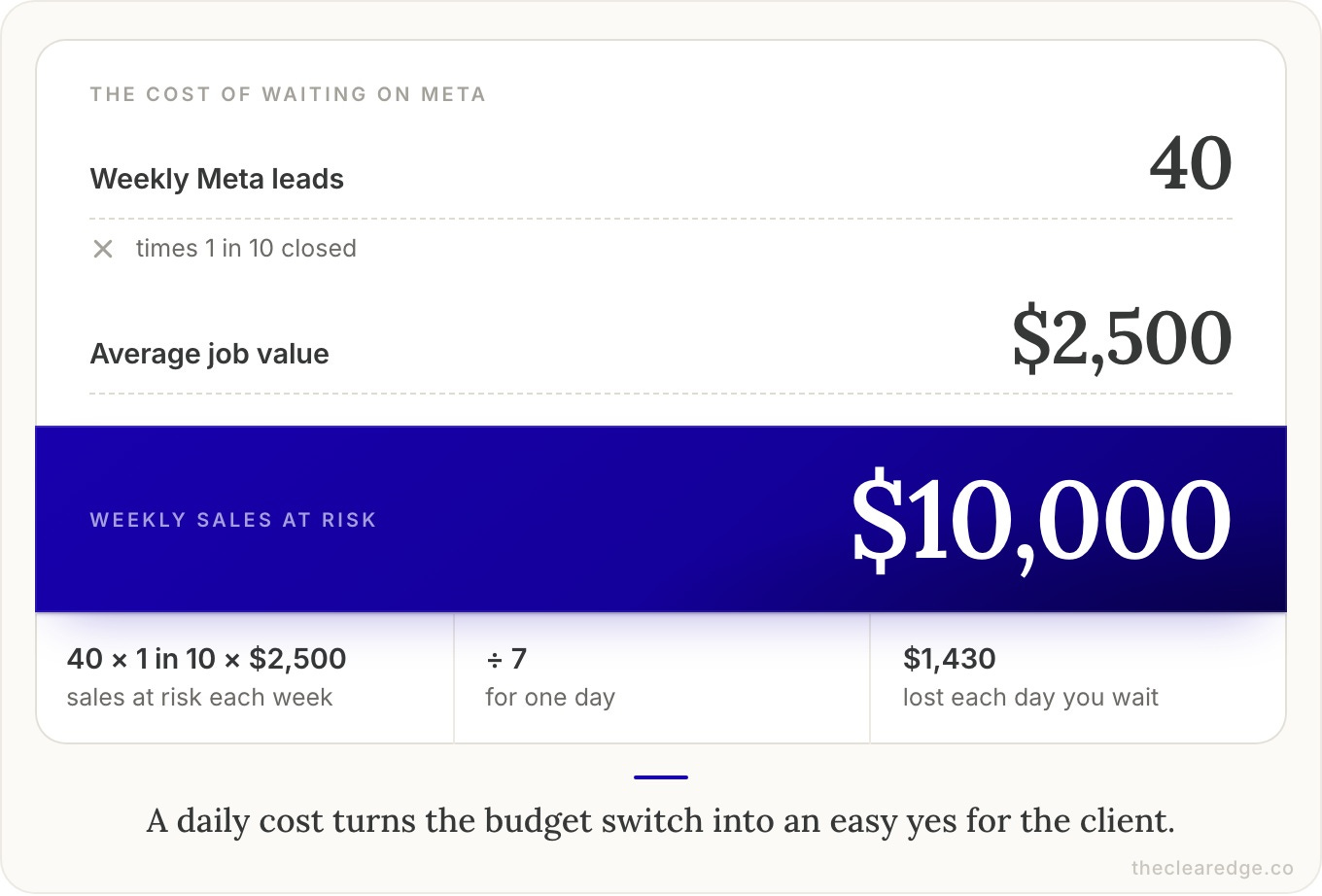
That daily figure turns the budget call into an easy yes, because your client can see what waiting costs.
How Renata Filed Her Appeal in 45 Minutes
Renata runs a 5-person paid-ads agency at $42,000 a month. Four clients are home-service firms: a roofer, a heating and air-conditioning company, a plumber and a landscaper. She runs their Meta lead ads from her agency’s own ad account and bills the spend back.
Each client spends $750 a week on Meta, for about 40 leads a week in all. Each closes about 1 lead in 10, and the average job is $2,500. So the four clients have about $10,000 of sales a week coming from her ads.
The roofer and the heating company each got 12 leads a week, so one day cost each about $429. The plumber’s 10 leads made his day $357, and the landscaper’s 6 made his $214.
On Thursday 15 October at 3:40pm, the disabled-account email arrived. Business Support Home showed Meta had hit the ad account and left her profile alone. The reason was unusual activity, since a freelancer she’d added on Monday had logged in from abroad.
She removed the freelancer, required two-factor login for all 3 admins and sent her passport photo. Then she requested one review with this note:
“Meta restricted my ad account for unusual activity on [date]. On [date] I added a contractor who logged in from [country]. I have removed that user, required two-factor login for all [number] admins, and confirmed my identity. Please review the restriction.”
She sent it at 4:25pm and didn’t open a new account.
