


The Executive Summary
$30K–$100K operators working 50–60 hour weeks risk bleeding 18–26 hours into noise that never moves revenue; installing the Signal Grid shifts that time into high-leverage work that compounds.
Who this is for: Operators and founders in the $30K–$100K band who feel overextended, spend 50–60 hours weekly “working,” and suspect most of that effort isn’t moving revenue.
The signal grid problem: You’re scattering focus across meetings, Slack, and “staying informed,” wasting 18–26 hours weekly on work that generates zero revenue and keeping your growth flat.
What you’ll learn: How to deploy the Signal Grid, build an Activity Tracking Spreadsheet, apply the Signal/Noise Classification Checklist, use the 2×2 Grid Visual Template, and run the Weekly Signal Percentage Calculator with the Default No Script.
What changes if you apply it: You go from reacting to Slack, meetings, and FOMO work to running a daily Signal Grid filter that eliminates 80% of busywork, holds 60–80% of your week in Quadrant 2, and frees up capacity for compounding revenue work.
Time to implement: Expect 11 hours across 5 days plus a 10-second daily filter and a weekly Signal Percentage review to lock in durable focus and prevent noise from rebuilding.
Written by Nour Boustani for $30K–$100K operators who want compounding focus and calendar control without bleeding weeks into busywork that never moves revenue.
If the 18–26 lost hours and constant context switching sound uncomfortably familiar, you don’t need more tips — you need the system. Upgrade to premium and install the Signal Grid as your daily filter.
› Library Navigation: Quick Navigation · Implementation Guides
What The Signal Grid Focus System Does For $30K–$100K Operators
The Signal Grid is your daily decision filter that separates signal (high-value activities) from noise (everything else). It stops your time from spreading across low-value work that keeps you busy without moving revenue.
Most founders at $10K–$30K aren’t short on effort—they’re buried under priorities that don’t move the needle. You end up working 50–60 hours a week on activities that feel productive but create no real growth.
Here’s the pattern: 73% of stalled businesses lose 18–24 hours a week to work that generates zero revenue. That’s not a guess; it’s based on 322 documented journeys.
The Signal Grid solves this with a simple scoring system and a 2×2 priority grid. Operators using this system report 40–60% productivity gains by systematically cutting noise activities.
What you’ll build:
Activity tracking system showing where time actually goes
Signal vs. noise classification for every task
2×2 grid mapping urgency and importance
Elimination protocol removing 80% of busywork
Daily decision filter preventing noise from returning
The outcome: You’ll be able to judge within 10 seconds whether any activity deserves your attention, and your calendar will shift from scattered chaos to focused time on the 20% of work that actually drives results.
The Signal Grid provides the theory and framework, and this guide gives you the exact implementation protocol.
When $30K–$100K Operators Should Implement The Signal Grid Focus System
Best time: Implement it as soon as possible at any revenue stage ($0–$200K+).
The Signal Grid is foundational—it’s the first filter you need before you build any other system. Without it, your effort spreads across noise and you’re left wondering why nothing compounds.
Critical time: When you feel buried by “opportunities.”
If you’re working long hours with little progress, constantly switching contexts, or saying yes to everything while getting nothing meaningful done, you need this system today.
Warning signs you need this now:
Working 50+ hours weekly, but revenue isn’t moving
Can’t list your top 3 priorities without hesitation
Calendar filled with meetings that generate zero revenue
20+ tabs open, 15+ active projects, nothing shipping
Feel busy all da,y but can’t point to what actually got done
Readiness requirements:
2 hours to build the initial system
Willingness to track activities honestly for one day
Ability to say no (or you’ll rebuild noise within a week)
The implementation takes 11 hours total spread across 5 days, and the focus benefit lasts for your entire career.
5-Day Signal Grid Implementation Protocol To Cut Busywork For $30K–$100K Operators
Day 1: Activity Tracking (3 hours)
Track every activity for one full workday in 15-minute blocks. No judgment, no filtering—just honest data about what you actually do.
What to track:
Activity name (specific: “Responded to Slack”, not “Communication”)
Time spent (15-minute blocks)
Revenue impact: Direct (generates revenue now), Indirect (builds revenue capability), None (no revenue connection)
How to track:
Set a timer to go off every 15 minutes, and when it rings, write down what you just did. Use a simple spreadsheet with three columns: Activity, Time, and Revenue Impact.
Common activities you’ll capture:
Client work (delivery, calls, emails)
Sales activities (outreach, proposals, follow-ups)
Marketing (content, social, campaigns)
Admin (email, Slack, scheduling)
Meetings (internal, external, recurring)
Learning (courses, podcasts, reading)
Operations (systems, processes, documentation)
The critical rule: Be brutally honest. Don’t write down what you wish you did—write down what actually happened. Most founders underestimate noise by 40–60%.
When Emilia tracked her day, she found 3.5 hours on “staying informed” (newsletters, Slack channels, industry news) that generated zero clients in 90 days. That’s 18 hours weekly, 936 hours yearly, or 23 work weeks of pure noise.
Result by the end of Day 1: A complete picture of how your time is actually spent, broken into 15-minute blocks with a clear, honest assessment of revenue impact.
Day 2: Signal Classification (2 hours)
Review your Day 1 activities. Classify each as Signal or Noise using clear criteria.
Signal criteria (must meet at least one):
Directly generates revenue this month (closes deals, delivers to paying clients)
Builds revenue-generating capability (creates assets that convert, builds systems that scale)
Prevents revenue loss (maintains client relationships, fixes critical issues)
Noise criteria (everything else):
Feels productive but doesn’t move revenue (reading industry news, attending networking events with zero conversion)
Busy work that could be delegated or eliminated (most admin, most meetings, most “staying aligned” activities)
FOMO activities you do because “everyone else does” (most social media, most content that gets zero conversions)
The scoring system:
Score each activity 1-5 based on revenue impact:
5: Directly generates revenue or saves significant time (client delivery, sales calls that close, building automation)
4: Supports revenue generation or efficiency (proposal creation, improving delivery systems)
3: Helpful but not critical (some meetings, some communication)
2: Low value, mostly FOMO (most newsletters, most social media scrolling)
1: Pure noise (everything that scores 1 gets eliminated permanently)
Create two lists:
Signal Activities: List everything scoring 4–5. These are the activities that directly move revenue or build capacity.
Noise Activities: List everything scoring 1–3. These are the activities you either eliminate or keep as small as possible.
One consultant found 47 Slack channels eating 8 hours a week. Only 6 channels created real value, so he scored the rest as 1–2 and cut 41 channels in 12 minutes.
Result by the end of Day 2: A clear classification of every activity as Signal (4–5) or Noise (1–3), with written lists showing exactly what to protect and what to remove.
Day 3: Grid Build (2 hours)
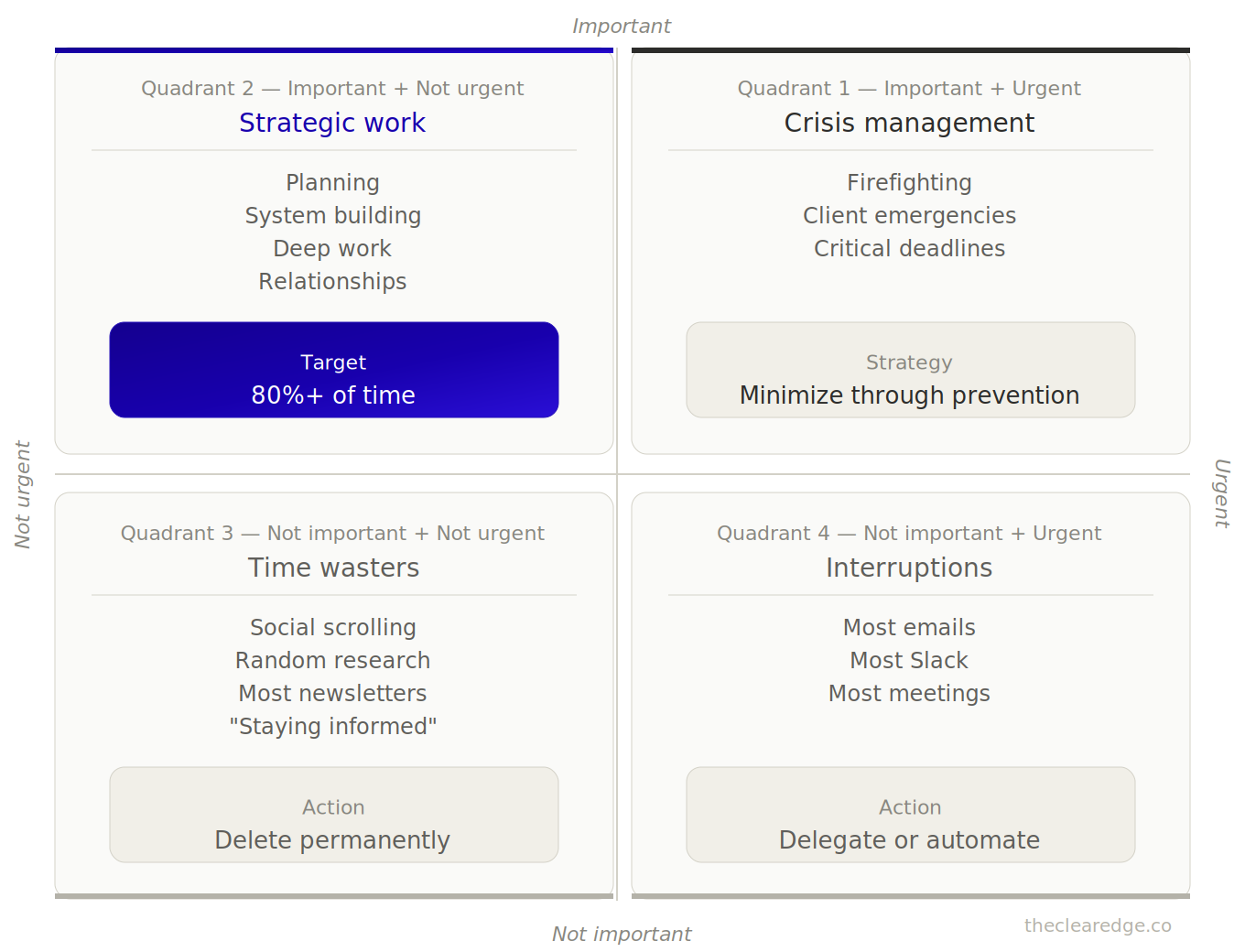
Create your 2×2 grid and map activities across two dimensions: Urgent vs. Not Urgent and Important vs. Not Important.
How to map activities:
Take your Day 2 lists and place each activity into one quadrant.
Quadrant 1 (Urgent + Important): Client emergencies, deal closings, and critical deadlines. These are fires you must put out today, and your goal is to keep time here low by preventing them in advance.
Quadrant 2 (Not Urgent + Important): Strategy, system building, relationship development, and deep work. This is where more than 80% of your time should sit because this is the work that compounds.
Quadrant 3 (Urgent + Not Important): Most emails, most Slack messages, and most meetings. They feel urgent but don’t move revenue, so you either delegate them or remove them.
Quadrant 4 (Not Urgent + Not Important): Social media scrolling, most newsletters, random research, and “staying informed” on topics that don’t matter to your business. Delete everything here.
The grid structure:
The reality check:
Most founders spend 60–70% of their time in Quadrants 1, 3, and 4 (firefighting plus noise), while elite operators spend more than 80% in Quadrant 2 (strategic signal work).
When you map your work honestly, you’ll see exactly where your capacity is bleeding. One agency owner found 22 hours a week in Quadrant 4 activities that generated zero clients in 12 months.
Result by the end of Day 3: A visual 2×2 grid showing the true position of every activity, making it clear where time is being wasted and where it actually compounds.
Day 4: Elimination Protocol (2 hours)
Now you cut. Ruthlessly.
Quadrant 4 (Not Urgent + Not Important): Delete everything with no exceptions and no “I’ll get back to it later”—it’s all permanent elimination.
Action steps:
Unsubscribe from newsletters scoring under 3 (keep a maximum of 2)
Leave/mute Slack channels scoring under 3 (keep a maximum of 6)
Delete browser bookmarks to time-wasting sites
Unfollow social accounts that pull you into scrolling
Cancel recurring meetings with no revenue connection
One coach deleted 31 newsletters in 8 minutes and had zero regrets 90 days later—nothing broke.
Quadrant 3 (Urgent + Not Important): Delegate or automate everything here. If you can’t delegate yet, these are the first activities you hand off when you hire.
Action steps:
Batch email to twice daily (11 am, 4 pm) instead of constant checking
Set Slack to “Do Not Disturb” except specific hours
Template responses for recurring questions
Decline recurring meetings where you don’t speak
Automate scheduling with Calendly or similar
Quadrant 1 (Urgent + Important): Reduce to a minimum through prevention. You can’t eliminate fires, but you can prevent 80% of them.
Action steps:
Build systems preventing recurring crises (client onboarding, project templates, quality checks)
Set clear expectations, preventing last-minute emergencies
Document processes reducing team dependency
Create buffers preventing artificial urgency
Quadrant 2 (Not Urgent + Important): Maximize time here. This is your 80%+ target.
Protection steps:
Block calendar for strategic work (minimum 20 hours weekly)
Protect morning hours for deep focus (no meetings before 1 pm)
Schedule Quadrant 2 activities first, fit everything else around them
Set boundaries: default answer to new requests = No (unless clear Quadrant 2)
The pattern across 47 founder audits: cutting Quadrants 3 and 4 typically reclaims 18-26 hours weekly. That capacity moves to Quadrant 2, where it compounds.
Result by the end of Day 4: 80% of noise eliminated permanently, clear plan for delegating what remains, calendar restructured around Quadrant 2 focus time.
Day 5: Implementation System (2 hours)
Build the daily filter, preventing noise from returning.
Daily decision filter:
Before accepting any new activity, ask: “Is this Signal or Noise?”
Signal: It scores 4–5 on revenue impact and sits in Quadrant 2. Accept it.
Noise: Everything else. The default answer is no.
The “Default No” script:
Template responses for declining noise:
“I appreciate the invite, but I’m protecting focus for client work right now.”
“That sounds interesting, but it’s outside my current priorities.”
“I’m not taking on new commitments this quarter.”
No lengthy explanations. No apologies. Just clean boundaries.
Weekly review system:
Every Friday, calculate your Signal Percentage:
Signal Hours (Quadrant 2) ÷ Total Work Hours × 100 = Signal Percentage
Target benchmarks:
Week 1: 40%+ (basic noise cut)
Week 4: 60%+ (sustained focus)
Week 12: 80%+ (mastery level)
Track this number weekly. If it drops below 60%, audit where noise returned and cut it again.
The review questions:
What percentage of time was in Quadrant 2 this week?
What noise activities returned? (Cut them again)
What new requests did I accept? (Should I have said no?)
Where did I default to busy work instead of deep work?
What one Quadrant 2 activity deserves more time next week?
One consultant tracks this in a simple spreadsheet: Week number, Total hours, Quadrant 2 hours, Signal percentage. When the number drops, she knows exactly where to investigate.
Result by the end of Day 5: Daily decision filter installed, weekly review ritual scheduled, clear system preventing noise from rebuilding.
From Pattern To Daily Filter
If the 18–26 lost hours and constant context switching hit home, premium gives you the ready-to-use Signal Grid toolkit so this focus filter runs every day, not just in theory.
Signal Grid Templates, Spreadsheets, Checklists, And Default No Scripts
1. Create an Activity Tracking Spreadsheet
Columns:
Time Block (8:00-8:15, 8:15-8:30, etc.)
Activity (specific description)
Revenue Impact (Direct/Indirect/None)
Score (1-5 based on revenue impact)
Quadrant (1/2/3/4 after classification)
Track one full day in 15-minute blocks. Be ruthlessly honest.
2. Use the Signal/Noise Classification Checklist
Score each activity 1-5:
5 = Directly generates revenue or saves significant time
Client delivery work
Sales calls that close
Building automation that saves 5+ hours monthly
Creating assets that convert (sales pages, proposals)
4 = Supports revenue generation or efficiency
Improving delivery systems
Content that drives qualified leads
Relationship building with potential clients
Process documentation
3 = Helpful but not critical
Some team communication
Some industry learning
Some networking
2 = Low value, mostly FOMO
Most newsletters (unless directly actionable)
Most group chats
Most “staying informed” activities
1 = Pure noise
Social media scrolling
Random research with no business application
Attending events with zero conversion history
Activities you do because “everyone else does”
The rule: Under 3 = Cut for 30 days. Track what breaks. (Spoiler: Nothing breaks.)
3. Use the 2×2 Grid Visual Template
Use this template to map all activities:
Quadrant 2 (Focus Quadrant): Strategic work, system building, deep client work, relationship development, and planning. The target is to spend 80% or more of your time here.
Quadrant 1 (Crisis Quadrant): Firefighting, urgent client issues, and deal closings under deadline. Keep this as small as possible by preventing problems early.
Quadrant 3 (Interruption Quadrant): Most emails, most Slack, and most meetings. Delegate or automate these.
Quadrant 4 (Waste Quadrant): Social scrolling, most newsletters, random learning, and “staying informed.” Delete these permanently.
Map every activity honestly. The visual shows exactly where your capacity is leaking.
4. Use the Weekly Signal Percentage Calculator
Formula: Quadrant 2 Hours This Week ÷ Total Work Hours × 100 = Signal %
Example:
Total work hours: 45
Quadrant 2 hours: 28
Signal percentage: 28 ÷ 45 × 100 = 62%
Benchmarks:
40-50%: Basic noise cut (good start)
60-70%: Sustained focus (strong execution)
80%+: Mastery level (elite operator)
Track weekly. If the percentage drops, audit where the noise returned.
5. Use the Default No Script
Template responses:
For networking invites: “I appreciate the invite, but I’m protecting focus time for client work right now.”
For collaboration requests: “That sounds interesting, but it’s outside my current priorities.”
For meeting requests: “I’m not taking new meetings this month—focused on shipping.”
For “quick call” requests: “Happy to help via email. What specifically do you need?”
For random opportunities: “I’m not taking on new commitments this quarter.”
No lengthy explanations. No apologies. Just boundaries.
Common Signal Grid Focus Mistakes Operators Make
Mistake 1: Classifying Noise as Signal
What it looks like:
“Networking feels important” even though it’s generated zero clients in 6 months. “Content marketing is essential” even though engagement doesn’t convert. “I need to stay informed” even though industry news has no business application.
Why it happens: Activities that feel productive get mislabeled as signal, and FOMO pushes their scores higher than they deserve.
How to avoid: Ask the 90-day revenue test: “Has this activity generated a client or prevented a major problem in the last 90 days?” If the answer is no, it’s noise—score it that way.
One agency owner scored “speaking engagements” as 5 (felt important) even though 8 hours a month for 6 months generated zero clients. The honest score was 1. He cut them and used those 8 hours for direct outreach, which converted at 12%.
Mistake 2: Tracking Dishonestly
What it looks like:
Logging the activities you wish you did instead of what actually happened. Rounding “15 minutes of Slack” down to “5 minutes” to feel better. Combining “client work + Slack + email” into one block to hide context switching.
Why it happens: Facing real time waste is uncomfortable, so it feels easier to bend the numbers than admit 3 hours a day disappear into noise.
How to avoid: Use a time tracking app like Toggl or RescueTime for the first week so everything is captured without self-reporting bias. The data doesn’t lie.
When one consultant used automatic tracking, he saw the truth: 18 hours a week in Slack (he thought it was 6). That gap costs him 936 hours a year, or 23 work weeks of capacity.
Mistake 3: Giving Up After Week 1
What it looks like:
Cutting noise feels great for 7 days, then old habits creep back. Slack channels get re-joined. Newsletters get re-subscribed. Meetings get re-accepted. By Week 4, the noise has rebuilt.
Why it happens: Behavior change without systems fails. You rely on willpower instead of structure. Willpower runs out; systems don’t.
How to avoid: Install the weekly review ritual. Every Friday, calculate your Signal Percentage, and if it drops below 60%, look at where noise came back and cut it again right away.
One coach slipped after 3 weeks. Her Friday review showed Signal % dropping from 68% to 43%. She re-ran the elimination protocol, cut the noise again, and got back to 65% the next week. The ritual caught the drift before it became permanent.
Signal Grid Quality Checkpoints
Week 1: 10-Second Signal vs. Noise Identification
What to check:
Can you look at any activity and classify it as Signal or Noise in under 10 seconds without hesitation?
Pass criteria:
You immediately know whether an activity scores 4-5 (Signal) or 1-3 (Noise)
No debate, no “maybe,” no “it depends”
The filter is instinctive
Fail indicators:
Still debating whether activities matter
Accepting requests without filtering
Saying “I’ll think about it” instead of an immediate yes/no
How to pass: Practice on 10 random activities a day and score each one 1–5 on the spot. The more reps you do, the faster the filter becomes automatic.
Week 4: 60%+ Time in Quadrant 2
What to check: Calculate your weekly Signal Percentage. Are you spending 60%+ of work time in Quadrant 2 (strategic, high-value work)?
Pass criteria: Quadrant 2 Hours ÷ Total Hours × 100 ≥ 60%
Example: 30 Quadrant 2 hours ÷ 45 total hours = 66.7% (Pass)
Fail indicators:
Signal percentage under 60%
Most time still in Quadrants 1, 3, 4 (firefighting and noise)
Calendar filled with reactive work instead of strategic work
How to pass: Audit your calendar. Block at least 25 hours a week for Quadrant 2 work and protect those blocks like client commitments. Everything else fits around them, not the other way around.
Week 12: Automatic No to Noise
What to check: Do you instinctively decline noise activities without internal debate? Has saying no become your default response?
Pass criteria:
Decline networking invites without guilt
Ignore Slack channels without FOMO
Skip newsletters without wondering what you missed
Say no to “quick calls” without overthinking
The Default No is automatic, not forced
Fail indicators:
Still accepting activities you know are noise
Feeling guilty about declining
FOMO is driving decisions instead of the signal filter
Explaining and apologizing instead of clean boundaries
How to pass: Track every request you receive for one week and mark each one as Signal or Noise. If you didn’t decline the noise right away and found yourself hesitating, you’re not at mastery yet—practice clean nos with no explanation.
One consultant reached mastery when he turned down 8 podcast invitations in a single week without hesitation. The month before, he would have accepted 6 of them out of FOMO. The shift was simple: he knew podcasts scored 1 (zero clients from 12 appearances), so the no was instant.
How The Signal Grid Connects To The Clear Edge Core Systems
This implementation guide builds on several foundational frameworks from The Clear Edge system.
Primary framework: The Signal Grid provides the complete theory, 1-5 scoring system, and strategic context for the focus filter.
Supporting frameworks:
The 3% Lever shows how tiny focus shifts compound into 10x revenue growth over 12 months. The Signal Grid identifies which 3% activities to protect.
The Time Fence teaches how to protect your Quadrant 2 hours once you’ve identified them through the Signal Grid.
The Bottleneck Audit helps identify your primary constraint—often hidden under noise activities the Signal Grid eliminates.
Case study proof: Emilia scaled to $35K solo by saying no to everything except her 3% lever—cutting 20 activities down to 2, growing from $22K to $36K in 11 weeks while working 20 fewer hours weekly.
Ready to eliminate 80% of busywork and reclaim your focus?
Start with Day 1 activity tracking tomorrow morning.
Track every 15-minute block honestly.
The data will reveal exactly where your capacity is bleeding—and what to cut first.
When 18–26 Lost Hours Become Your Ceiling
If you keep feeding 18–26 hours of noise every week, you’re choosing a permanent 40–60% productivity handicap; move those hours into signal work or stay locked at $30K–$100K.
Run Your Signal Grid Focus Scoring Gate Checklist
Next time a new task, meeting, or “opportunity” hits your calendar, run these before you say yes.
☐ Scored the activity 1–5 on revenue impact using the Signal/Noise Classification Checklist and wrote the score in your Activity Tracking Spreadsheet
☐ Mapped the activity into the 2×2 grid and wrote its quadrant number next to the score (1, 2, 3, or 4)
☐ Logged whether it’s Signal (4–5, Quadrant 2) or Noise (1–3, Quadrants 3–4) in your Signal Activities vs Noise Activities lists
☐ Applied the Default No Script in writing if it scored 1–3 or landed in Quadrants 3–4, keeping it off your calendar completely
☐ Updated this Friday’s Signal Percentage line with the added or avoided hours so your Quadrant 2 time stays above the 60–80% target range
This is how you stop 18–26 weekly busywork hours from quietly escaping into Quadrants 3 and 4 instead of compounding in Quadrant 2.
FAQ: Signal Grid Focus System For $30K–$100K Operators
Q: How does the Signal Grid help $30K–$100K operators cut 80% of busywork?
A: The Signal Grid uses a 1–5 revenue impact score plus a 2×2 grid to classify tasks, then eliminates Quadrants 3 and 4 so 18–26 wasted hours each week shift into high-leverage Quadrant 2 work.
Q: How do I use the Signal Grid with its 2×2 priority grid before I take on new work?
A: Before accepting any activity, you score it 1–5 on revenue impact, map it into one of the four quadrants, and only accept tasks that score 4–5 and live in Quadrant 2 while defaulting to “no” for everything else.
Q: How much time does it take to implement the full 5-day Signal Grid protocol?
A: Expect 11 total hours across 5 days—3 hours for tracking, 4 hours for classification and grid build, and 4 hours for elimination and installing the daily filter and weekly review.
Q: When should I implement the Signal Grid if I’m already at 50–60 hour weeks?
A: Implement it immediately when you’re working 50+ hours, feel overwhelmed by “opportunities,” and see warning signs like 20+ tabs, 15+ projects, and a calendar full of non-revenue meetings.
Q: Why do 18–26 hours keep disappearing into noise that never moves revenue?
A: Because most operators misclassify FOMO activities, “staying informed,” and low-conversion networking as signal, they underestimate noise by 40–60% and bleed 18–26 hours weekly into work that has generated zero clients in 90 days or more.
Q: How does the daily Signal vs. Noise filter work in under 10 seconds?
A: You quickly ask “Is this Signal or Noise?”, check if it scores 4–5 and sits in Quadrant 2, and if not, you default to “no” using the pre-written Default No Script so every new request passes through the filter before hitting your calendar.
Q: What happens if I skip the weekly Signal Percentage review?
A: Without calculating your Signal Percentage every Friday, noise quietly rebuilds, your Quadrant 2 time falls below 60%, and within a few weeks you’re back to firefighting in Quadrants 1, 3, and 4 while your revenue stalls.
Q: How much time can I realistically reclaim by cutting Quadrants 3 and 4 with this system?
A: Across 47 founder audits, cutting Quadrants 3 and 4 typically frees 18–26 hours weekly, which then moves into Quadrant 2 activities that compound into better clients, cleaner systems, and more predictable revenue.
Q: What happens if I keep mislabeling noise as signal, like newsletters and networking?
A: You’ll stay stuck in the pattern where things that feel important but have produced zero clients in 90 days—like low-yield speaking, generic content, and most newsletters—keep scoring as 4–5 instead of 1–2, so you never reclaim the 20+ hours weekly needed for true Quadrant 2 work.
Q: How do I know the Signal Grid is working after Week 1, Week 4, and Week 12?
A: In Week 1 you can classify any task as Signal or Noise in under 10 seconds, by Week 4 your Signal Percentage is consistently 60%+ of work hours in Quadrant 2, and by Week 12 saying “no” to noise is automatic, with clean boundaries and no guilt or FOMO.
⚑ Found a Mistake or Broken Flow?
Use this form to flag issues in articles (math, logic, clarity) or problems with the site (broken links, downloads, access). This helps me keep everything accurate and usable. Report a problem →
› More to Explore: Quick Navigation · Implementation Guides
➜ Help Another Founder, Earn a Free Month
If this system just saved you from bleeding 18–26 hours a week into busywork that never moves revenue, share it with one founder who needs that relief.
When you refer 2 people using your personal link, you’ll automatically get 1 free month of premium as a thank-you.
Get your personal referral link and see your progress here: Referrals
Get The Signal Grid Implementation Toolkit
You’ve read the system. Now implement it.
Premium gives you:
Ready-to-use PDF toolkit—every template, diagnostic, and formula pre-filled, zero setup, immediate use
Plug-and-play AI diagnosis sessions—drop into Claude, Gemini or ChatGPT, answer a few questions, save hours of guessing, get your exact next move
Audio key points—concentrated frameworks you can absorb in minutes, implement while you move
Unrestricted access to the complete library—every system, every update
What this prevents: Bleeding 18–26 hours every week into non-revenue noise that keeps your growth flat.
What this costs: $49/month.
Download everything today. Implement this week. Cancel anytime, keep the downloads.
Already upgraded? Scroll down to download the PDF, audio, and your AI session.
